
Notes for teachers#
Skills: Simulating stochastic systems, NumPy, algorithmic thinking
Prerequisites: Installing packages, NaNoPy, basic Python
Difficulty: [**]
Setup time: 10 minutes
Core time: 30 minutes (dice) + 30 minutes (pi)
Motivation#
Why teach Monte Carlo simulations?#
A basic understanding of Monte Carlo simulations is very useful when writing biomolecular simulations. It highlights the commonality between various simulations and shows how structure can arise from a stochastic system.
Simple Monte Carlo simulations also present a good bridge between writing basic deterministic Python scripts and trying to represent the complexity of biology in a stochastic biomolecular simulation. They allow students to reason about simulation loops and random effects without needing to dive into a biological system.
What can students learn beyond a simulation technique?#
Vectorization with NumPy. Monte Carlo simulations work by simulating many (!!) random events, providing an excellent use case for NumPy arrays and vectorized operations. By having the students write serial code and then asking them to vectorize their code, we make this explicit.
Algorithmic thinking. In both sections, we ask students to think about the data structures used to represent the objects in their Monte Carlo simulations. This is supplemented in the second section by having the students think about their simulation loop and their order of operations.
Good coding practices. A common way to write better code is separating simulation logic from visualization code. This makes it easier to debug the code.
Learning objectives#
By the end of this demo, students should be able to:
Apply NumPy to generating and processing random events
Display numerical results to users with good formatting
Compare (biomolecular) simulation loops
Distribution & format#
This demo can be distributed either via GitLab or Brightspace as a standalone file,
or handed out as the versions/ folder directly. The _template.py files are the
student handouts (no solution code), the _solution.py files are the teacher’s
answer copies.
File |
Description |
|---|---|
Dice exercise: task prompts and setup only, no solution code — hand this to students. |
|
Dice exercise: task prompts and full solution — the teacher’s answer copy. |
|
Pi exercise: task prompts and setup only, no solution code — hand this to students. |
|
Pi exercise: task prompts and full solution — the teacher’s answer copy. |
All files are generated from scripts/generate_versions.py. You can edit the fragments
there and re-run it rather than editing a file under versions/ directly.
Teaching format#
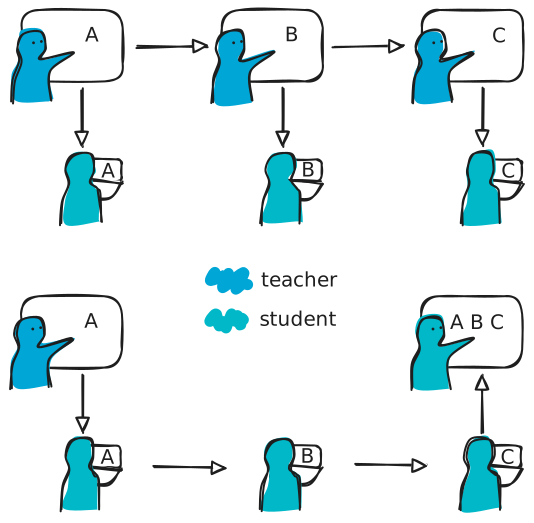
Modularity. This demo was designed to be modular. Of the two sections, Estimating average dice results is more appropriate for beginning programmers exploring NumPy. Estimating pi requires combining numeric calculations with visualization and provides an interesting challenge for students who want to make the leap to simulating biological systems. When hosting both demos, the appropriate order is first Estimating average dice results, then Estimating pi.
Code-with-me. This demo material is appropriate for a demo where a teacher or teaching assistant at the front of the class guides students through the coding problem, asking them questions about how they would approach each step and keeping the class on track. This approach prioritizes time efficiency and the flexibility to highlight specific parts of the demo in response to class feedback.
Practice-and-present. Alternatively, a short explanation could be given at the front, then students work out the exercise themselves or in groups. A subset of students present their result and reasoning at the end. This may be more appropriate for intermediate students that want to work at their own speed.