
Refactoring with zip() and enumerate()#
Student template
Continue in the same file you used for Filling the template: versions/07_student_template.py.
Here is one way to solve Filling the template by iterating over indices:
# Implementation that iterates over indices

outputs = []

# outer loop iterates over the indices of separate advertisements
for i in range(len(ADDRESSES)):
    output_for_this_address = []
    outputs.append(output_for_this_address)

    # inner loop iterates over lines in the template
    for j in range(len(REACTION_TEMPLATE)):
        line = REACTION_TEMPLATE[j]

        # construct the correct value for [[NAME]]
        names_connected = ""
        for k in range(len(NAMES[i])):
            if k == 0:
                pass
            elif k < len(NAMES[i]) - 1:
                names_connected += ", "
            else:
                names_connected += " & "

            names_connected += NAMES[i][k]

        line = line.replace("[[NAME]]", names_connected)
        line = line.replace("[[ADDRESS]]", ADDRESSES[i])
        line = line.replace("[[PRICE]]", str(PRICES[i]))
        line = line.replace("[[YOUR NAME]]", "John Doe")

        output_for_this_address.append(line)

for lines in outputs:
    print()
    print("\n".join(lines))
For the remainder of this assignment, feel free to use your own code or the example supplied. Instructions were tailored to the example above, but are likely applicable to your own solution too.
Issues in the example above#
The code above is hard to read. It contains deeply nested for-loops that use three separate variables to iterate over indices. This makes it difficult to understand what variable to use to index a particular data structure. A good (bad) example of this is the outer for-loop iterating over the indices of ADDRESSES using variable i. Clearly, i can be used to index ADDRESSES. However, the fact that i can be used to index PRICES is left implied. The person writing this code could easily have misinterpreted the situation and used j instead. This is a very common and nefarious source of bugs that can stay undetected because it does not always raise an exception.
It would be much clearer if each iteration of the for-loop created fresh instances of price, address, and names that belong together. This would automatically document that they belong together, something previously hidden in the iteration over indices. However, features that require index as an input, like creating names_connected (see above), as well as features that require simultaneous iteration over multiple lists (ADDRESSES, NAMES, PRICES), complicate this.
This demo is going to teach you three easy to apply tricks that together can solve this issue for 99% of all for-loops you will ever encounter. They will make it a lot more fun and convenient to work with for-loops and make your code significantly more readable.
Tasks#
Task 1: Iterating over elements instead of indices#
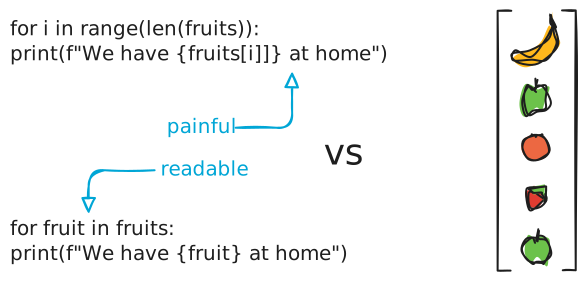
As teased above, Python code becomes easier to read if you iterate directly over elements instead of indices. The reason for this is three-fold. Firstly, you turn a non-descript variable i into a properly named variable like fruit. Secondly, you reduce the amount of square brackets on screen. This is one fewer detail that your eyes can be distracted by. Finally, it makes your code closer to natural language. The statement for fruit in fridge: do this is a sentence that is understandable even to non-programmers.
(a) Refactor the iteration over lines in the REACTION_TEMPLATE to iterate over elements instead of indices.
Syntax: Element-wise iteration
Element-wise iteration is easier than index-based iteration if you only have one list you are iterating over and do not need to know the index of each element. The code below produces the same result in two ways:
fruits = ['banana', 'apple', 'orange', 'strawberry', 'apple']

for i in range(len(fruits)):
	print(f"We have {fruits[i]} at home.")

for fruit in fruits:
	print(f"We have {fruit} at home.")
The element-wise iteration is a lot clearer and easier on the eyes.
A useful feature of element-wise iteration is that it generalizes to other Python data structures in contrast to index based iteration. Take a Python set as an example.
languages_i_speak = {'dutch', 'german', 'english'}

# does not work:
for i in range(len(languages_i_speak)):
	print(languages_i_speak[i]) # you cannot index sets

# works!
for language in languages_i_speak:
	print(language)
Task 2: The enumerate() function pairs element with index#
Tuple unpacking
Both the enumerate() and zip() functions discussed in this demo hand you a tuple of values at every iteration. This tuple contains more information than a single element from the list(s) you are iterating over. If you know the number and order of different elements in a tuple, you can use Python’s tuple unpacking feature to assign different parts of the tuple to separate variables.
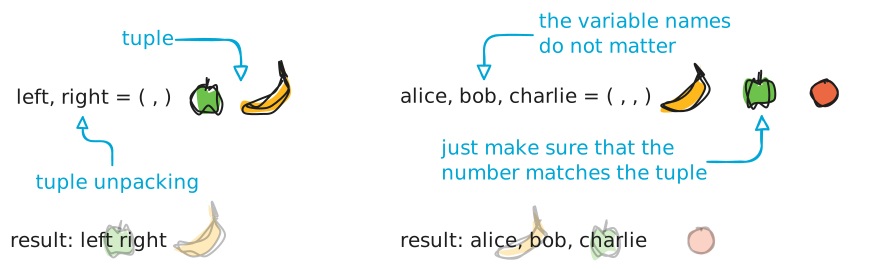
This same principle applies in the header of a for-loop. If you iterate over a list of pairs stored in tuples, you can unpack them into two separate loop variables.
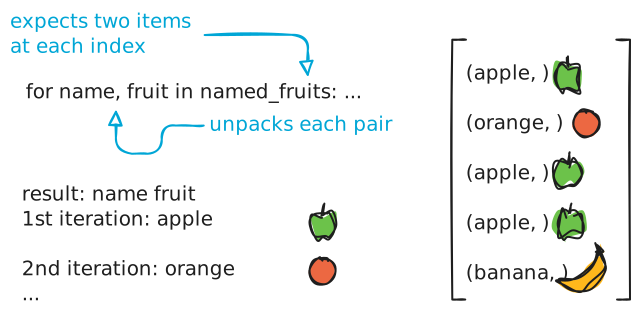
The enumerate() function takes a Python list as argument and pairs each element of the list with its index. This lets you use element-wise iteration even if your code also requires information about the position of each element within the list.
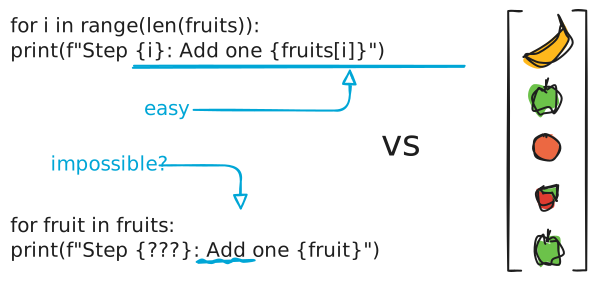
Using enumerate() is an easy way to make your code more readable.
# without enumerate
for i in range(len(fruits)):
	print(f"Step {i}: Add one {fruits[i]}")


# using enumerate

# tuple unpacking into i and fruit
#    v
for i, fruit in enumerate(fruits):
	print(f"Step {i}: Add one {fruit}")
enumerate() outputs a list[1] containing tuples of (index, element).
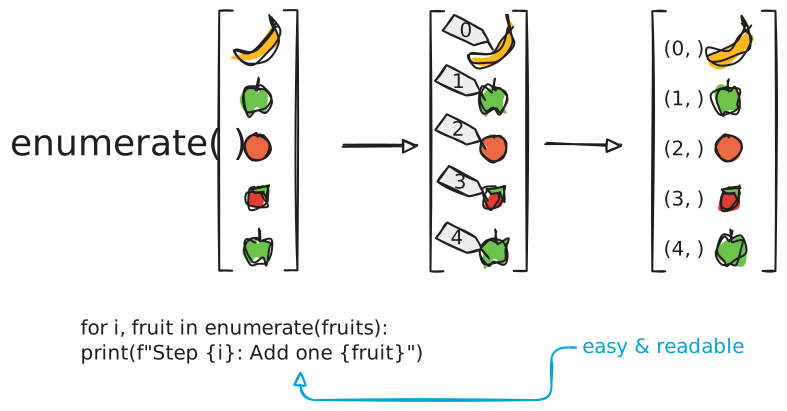
(a) Refactor the code to use enumerate() in the for-loop constructing names_connected. The index can help you tell whether to put a comma or an ampersand between individual names.
Task 3: The zip() function groups elements of different lists#
At this point, only one purely index-based iteration should be left in the code. The outer for-loop iterates over separate advertisements and groups elements of NAMES, ADDRESSES, and PRICES together if they have the same index. In order to turn this construction into element-wise iteration, you will make use of the zip() function.
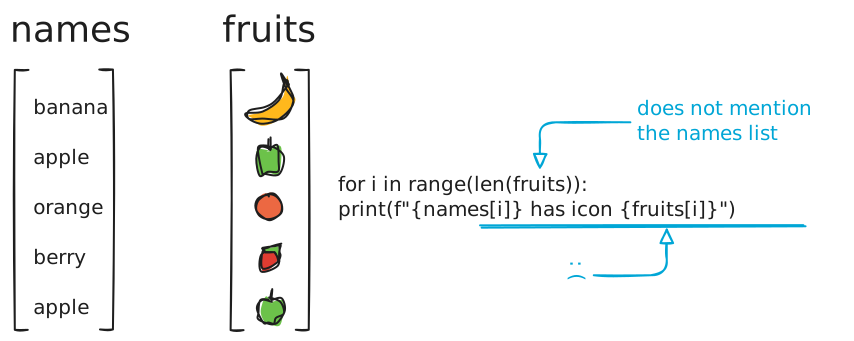
Like the name implies, zip() zips together two or more lists into a single list[1] such that elements with the same index are paired together. To zip together lists, simply supply them to zip() as arguments separated by a comma.
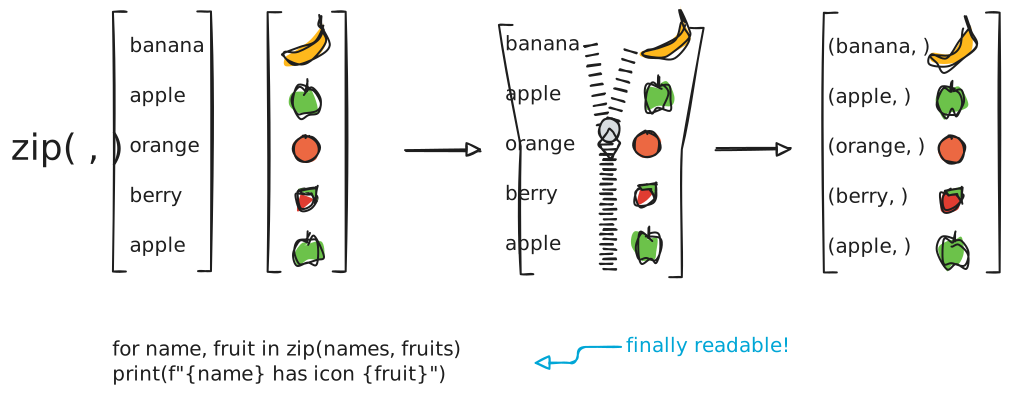
Each group of elements of the same index is stored in a tuple. The order within that tuple reflects the order of arguments supplied to zip(). This makes it easy to access them with tuple unpacking.
numbers = [1, 2, 3, 4, 5]
names = ['banana', 'apple', 'orange', 'berry', 'apple']
fruits = ['🍌', '🍎', '🍊', '🍓', '🍎']

# index-based: only groups indices together by implication
for i in range(len(numbers)):
	print(f"{numbers[i]}: {names[i]} has icon {fruits[i]}")

# element-based with zip: groups elements together explicitly
for number, name, fruit in zip(numbers, names, fruits):
	print(f"{number}: {name} has icon {fruit}")
(a) Refactor the outer for-loop to use zip() to iterate over advertisements. Supply all relevant lists to zip() and unpack the output into appropriately named variables.
Task 4: Easy readability wins#
As a final touch, we will move calculations that only need to happen once per iteration out of the inner for-loop. This helps keep the for-loop small and readable.
(a) Move the name-construction loop out of the inner loop.
Solution
Below you can find a solution to tasks 1 through 4.
# Using zip() and enumerate()

outputs = []

for address, names, price in zip(ADDRESSES, NAMES, PRICES):

    names_connected = ""

    # Removing unnecessary indentation (no need to recalculate every line)
    for i, name in enumerate(names):
        if i == 0:
            connector = ""
        elif i < len(names) - 1:
            connector = ", "
        else:
            connector = " & "

        names_connected += connector + name

    output_this_address = []
    outputs.append(output_this_address)

    for line in REACTION_TEMPLATE:
        line = line.replace("[[NAME]]", names_connected)
        line = line.replace("[[ADDRESS]]", address)
        line = line.replace("[[PRICE]]", str(price))
        line = line.replace("[[YOUR NAME]]", "John Doe")

        output_this_address.append(line)


for lines in outputs:
    print()
    print("\n".join(lines))